Install the plugin, publish: the audio appears on its own
The official WeDispatch connector for WordPress. One button links the site to your account, you pick a voice: on every publish, the article is synthesised and the player shows at the top. Your journalists change nothing.
Wiring an audio service into WordPress usually means development: calling an API on publish, hosting the files, inserting a player into the theme. Few newsrooms have the time or the team for that.
Install the plugin, publish: the audio appears on its own
Install and activate
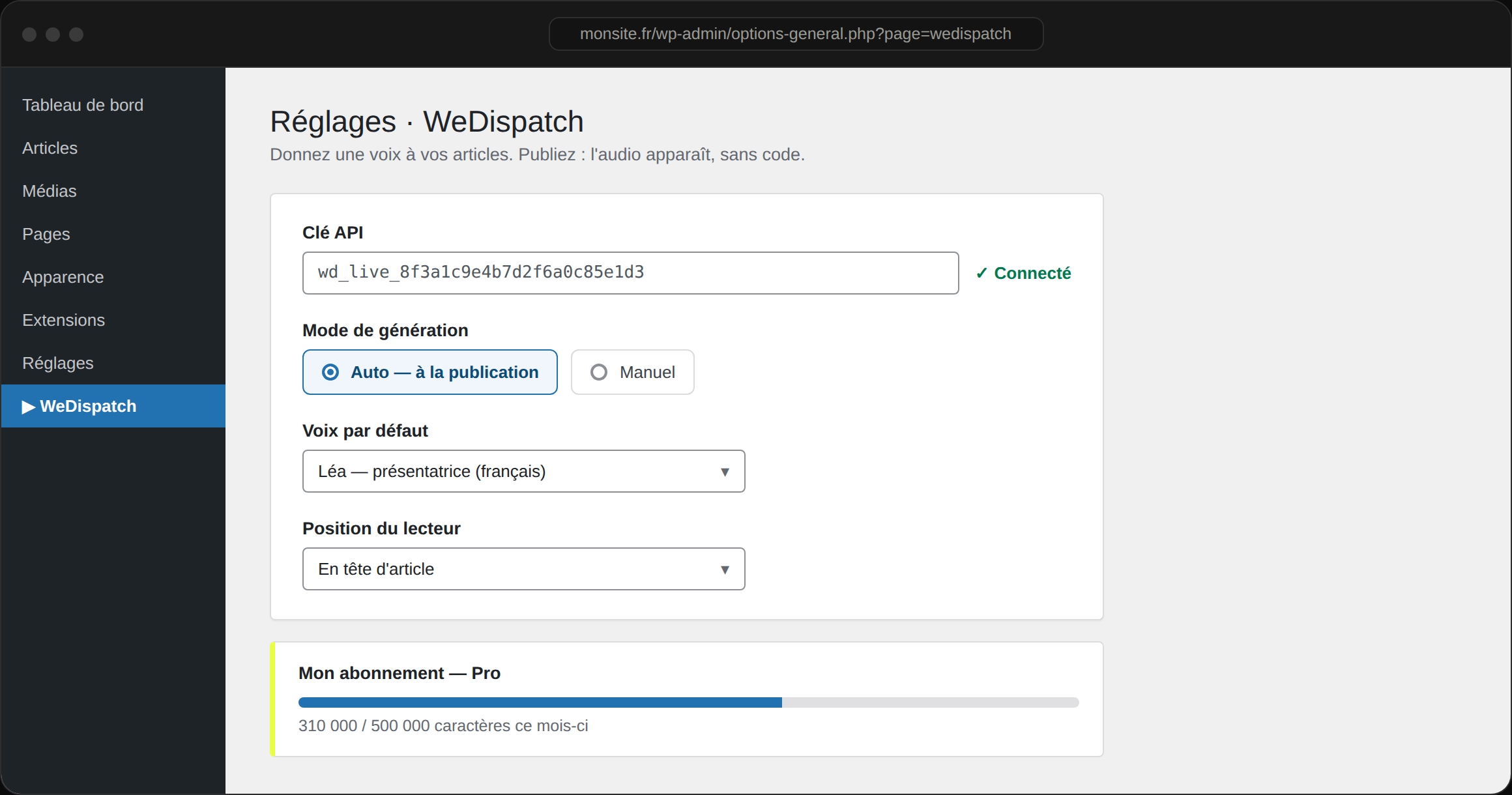
Upload the plugin in WordPress (Plugins → Add New) and activate it. A WeDispatch menu appears in the sidebar: open it and click “Connect this site”. Five minutes, no code, no key to copy.
Choose the mode
Auto: audio generates on publish. Manual: the author generates from the article, listens, then publishes. Your call.
Publish, the audio appears
The player shows at the top or bottom of the article, or wherever you want with the [wedispatch] shortcode. Nothing to touch in the theme.
Zero code, zero copy-paste
Install, one connect button, done. The key is exchanged server to server and never travels through a browser. Generation runs on the service side: your WordPress server is never called on.
Voice per section and author
The section → author → site voice routing picks the right voice, with a preview in the editor.
Multilingual & synced text
23 reading languages, from French to Japanese, and word-by-word highlighting as an option: all from the settings.
Your plan in view
A “My subscription” panel shows plan and monthly usage, right inside WordPress.
Any WordPress newsroom: regional dailies, magazines, pure players, institutional sites that want audio with no technical project.
Ready to give your articles a voice?
Book a 30-minute demo: we set WeDispatch up with you, no complex setup.
Do I need to code?
No. You upload the plugin, open the WeDispatch menu, click “Connect this site” and authorise from your account, then pick a voice. There is no key to find or paste. Generation and hosting happen on WeDispatch's side; the theme isn't modified.
Auto or manual?
Both exist. In Auto, audio generates on publish. In Manual, the author generates from the editor, listens, then publishes. Set per site.
How is the voice chosen?
In Auto, in the order section → author → site default. The editor panel shows the voice that will actually be used.
Does the plugin slow my site?
No. Synthesis happens off your server, and the player is a light script loaded deferred. This site's key stays server-side, never exposed to the browser.